
actiTIME2016 - Download
You'll be able to download in few seconds.
Publisher Description
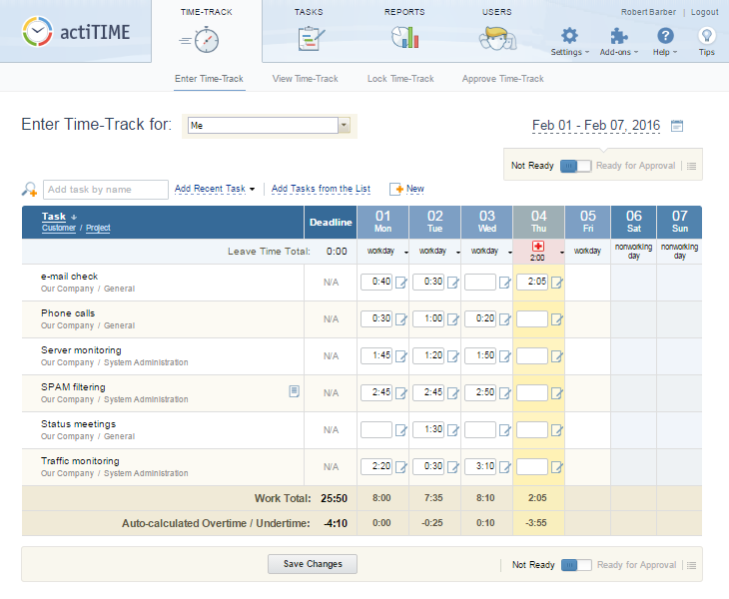
actiTIME is time tracking software for companies of any size and any business type.
It allows you to enter time spent on different work assignments,register timee off and sick leaves,
and then create detailed reports covering almost any management or accounting needs.
actiTIME streamlines the corporate business process and helps its users organize their
work better, increase company performance and collect critical billing and payroll information.
Who will benefit from using actiTIME?
Regular Users
Track time in a convenient, friendly looking weekly timesheet
Start using the software without overhead or special training
Organize work efficiently with task deadlines and personal performance information
Team Managers
Create and assign tasks to the team members
Gather necessary data using powerful reporting tools
Control over the process and achieve project goals
Accounting Managers
Handle overtime balances and verify the work of contractors
Get accurate information for the client billing
Analyze cost of various work activities within the process
About actiTIME
This Project Management program is available in English. It was last updated on 29 September, 2026. actiTIME is compatible with the following operating systems: Other, Windows.
The company that develops actiTIME is actiTIME Inc.. The latest version released by its developer is 2016.
The download we have available for actiTIME has a file size of 45.1 MB. Just click the green Download button above to start the downloading process. The program is listed on our website since 2015-11-30 and was downloaded 0 times. We have already checked if the download link is safe, however for your own protection we recommend that you scan the downloaded software with your antivirus. Your antivirus may detect the actiTIME as malware if the download link is broken.
How to install actiTIME on your Windows device:
- Click on the Download button on our website. This will start the download from the website of the developer.
- Once the actiTIME is downloaded click on it to start the setup process (assuming you are on a desktop computer).
- When the installation is finished you should be able to see and run the program.
Program Details
System requirements
Download information
Pricing
Version History
version 2016
posted on 2015-11-30
1) Usability improvements;
(2) actiTIME Mobile;
(3) Interfaces redesign.
version 1.5.0
posted on 2009-01-21
UTF-8 support; Auto-Installation for MS Vista; usability improvements; install improvements, tooltip with credentials for login
Disclaimer
External Download
We do not host actiTIME on our servers. We did not scan it for viruses, adware, spyware or other type of malware. This app is hosted by the software publisher and passed their terms and conditions to be listed there. We recommend caution when installing it.
The external download link for actiTIME is provided to you by apps112.com without any warranties, representations or guarantees of any kind, so access it at your own risk.
If you have questions regarding this particular app contact the publisher directly. For questions about the functionalities of apps112.com contact us.
